PhD students
The Library’s Writing Center supports Corvinus PhD Students in academic success. Courses, training sessions, individual consultations are held either personally or in online form through Teams. Topics focus on supporting information literacy, publishing and publication strategies.
Research support courses
Library x DSU – “Research Day at the Library!”
Would you like to scale up your research skills as a PhD student? Then join us in the Library on April 29th for a day of research related workshops and seminars!
10:00-11:30 Research Pitching Workshop with professor Robert Faff – Learn about professor Faff’s Research Pitching Framework, and use it to design, plan and pitch your own research projects.
12:00-13:00: Lunch (sandwiches)
Presenters:
Erzsébet Nyitrai – Library: General overview of the peer-review process
Dr. Márta Aranyossy – Chief Editor of Budapest Management Review: Experiences from the Editor-in-Chief’s Perspective
Dr. Attila Dabis – Library: Peer-review experiences of a co-authored article and review criteria of the journal (Minority Protection), which he co-edits
Alexandra Horváth – Library: Presentation of the operation of OJS (Open Journal Systems), review writing and responding
You’ll also have the chance to practice what you’ve learned and review someone’s paper – and have your paper reviewed in turn. Consultations with Library staff available afterwards to help you with implementing the suggestions of the review you received.”
Location: Lecture room of the Library (Aquarium) (Building C, 1st floor)
Registration for the morning and afternoon sessions:
Library x DSU: Research Day – Peer Review Workshop
Library x DSU: Research Day – Research Pitching with prof. Robert Faff
Webinar series for doctoral students
Clarivate is launching a webinar series specifically for doctoral students
The series aim to provide practical knowledge that can be directly applied during doctoral studies, including the following topics:
- literature search strategies and analysis of publication trends
- journal selection and publication visibility
- research impact and interpretation of citation metrics
- research profile management and visibility enhancement
The program consists of thematically structured, interrelated sessions, but individual webinars can also be attended independently. The goal is to enable participants to support their own research and publication activities with greater confidence.
The webinars are in English, and the company will send the recording to all registered participants.
Training sessions
Practical information toolkit for doctoral students
The session is held in the Autumn semester, students from all Doctoral Schools can apply. The course aim is to help doctoral students make the first steps in their careers as researchers. It intends to provide guidance in acquiring the knowledge, behaviour, skills and attributes of successful researchers and develop their full potential through their own professional development framework.
At the end of the course students will be able to carry out an in-depth literature search and review, observe and adopt the principles of open access and open science. They will gain some general knowledge about the practices of research data management. They will have an overview of the different models of research assessment and will know and adhere to the principles of academic and research integrity.
UPDATES SOON.
Information skills for academic success
The session is offered primariliy for students of Doctoral School of Business and Management and held in the Spring semester.The course aim is to help doctoral students make the first steps in their careers as researchers. It intends to provide guidance in acquiring the knowledge, behaviour, skills and attributes of successful researchers and develop their full potential through their own professional development framework.
At the end of the course students will be able to carry out an in-depth literature search and review, observe and adopt the principles of open access and open science. They will gain some general knowledge about the practices of research data management. They will have an overview of the different models of research assessment and will know and adhere to the principles of academic and research integrity.
UPDATES SOON.
Individual or group consultation
The library offers individual and small group consultation sessions for CUB lecturers, PhD-students, covering different library fields and services. To consultationany of them please fill in the following form.
Knowledge Base
Scholarly sources
Library sources
The Library offers both printed and electronic resources, which can be searched using the following three search interfaces:
The Open Public Access Catalogue (OPAC): contains documents available in the library’s physical collection and is suitable for finding specific printed books. You might find some electronic books and links to electronic versions associated with the printed record.
Journals and Ebooks: a search engine that helps you to find full-text electronic articles and e-books available in the library. Start the search with the title of the journal/e-book, even if you are searching for an article or a book chapter. In addition, bibliographic data for printed journals is also available with a link to the OPAC. The search engine includes both subscribed and free sources (e.g. DOAB, DOAJ, JSTOR OA books, etc.). Electronic resources can be accessed remotely using VPN.
Super Search: a comprehensive one-step search engine that allows you to search in the content of our databases containing scholarly literature, as well as printed books from the Library’s physical collection. In addition, two Corvinus repositories (Corvinus Research and PhD Dissertations) and other free, relevant sources are also integrated. Databases containing data (financial, statistical) and legal materials cannot be searched in Super Search; these must be used separately.
Although Super Search is suitable for finding specific works, it is mainly helpful for topic search. The search should start with keywords and be refined with filters and field restrictions. Most of the sources are in English. Supersearch also lists documents that are not available in full text but may be helpful for a given topic. These can be requested through interlibrary loan by clicking the link below the search results and copying the data.
External sources
Google Scholar: searches for scientific literature, but also harvests predatory publishers’ journals, which do not have a peer review process before publication. We have compiled the characteristics of predatory publishers and ways to check publications under Predatory publishers.
You can also set Google Scholar to mirror the Corvinus collection (remotely, via VPN) by following the instructions here.
Grey literature: documents such as research reports, working papers, and dissertations belong to this category. Non-publishing units, such as organisations, research institutes, and universities, usually publish them.
Finding them is difficult because there is no platform where all of these can be searched; they lack a uniform description, their formats vary, they are not permanently accessible, etc. Platforms where grey literature can be found include: BASE, OpenAIRE, CORE and various institutional and other repositories. General search engines (Super Search, GS) also search (to some extent) for this content independently or through multiple indexes.
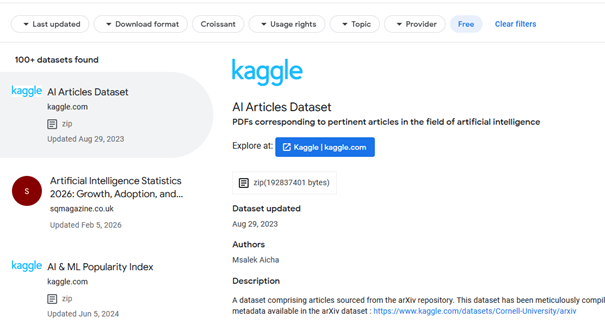
Datasets: To search for datasets, try Google with e.g., “sociological dataset” as the search term. The results list the significant collections (ICPSR, Roper, US Census, CNTS, etc.) and provide university Libguide pages where various datasets have been collected.
Another option is Google Dataset Search, which lets you search for specific datasets. Free datasets are available by clicking on the Free filter in the next step.
Further information on other sources and search tips can be found in Library usage – scholarly literature sources and E-learning material.
Featured databases
The following databases, due to their content, are handy for doctoral students.
SAGE Research Methods
SAGE Research Methods: SRM is a research methodology database that provides theoretical background information for various research methods (e.g. social network analysis). Books, encyclopaedias, journals, some podcasts and videos are available in the database. The Little Blue series focuses on qualitative methods, while the Little Green series focuses on quantitative methods.
We do not have access to Cases or Datasets (content with a grey background), but individual researchers can request a 30-day free trial for them.
It is recommended to enable the “Content available to me” filter when searching to return only documents with full text.
In addition to documents, the database offers several research support tools, such as Project Planner and Which Stats Test, which help select statistical methods.
JSTOR
JSTOR is an archive database containing peer-reviewed journals, academic e-books, and primary sources. Our subscription covers the entire JSTOR collection, ensuring representation across all academic fields. Journals are typically available from early volumes (in most cases from the very beginning), but due to the nature of the database, the last 1-5 years are not. The built-in AI tool can be activated with an account created within the database.
Web of Science and Scopus
WoS and Scopus are bibliographic databases that contain references to major scientific journals across various scientific fields. They support scientometric analysis, map individual career paths, and serve as a starting point for systematic literature search. The full text of the documents is only available if the library has a subscription to the journal.
The overlap between the two databases in the field of social sciences in the 1990-2025 period is approximately 80-90%.
There are some differences between the two databases. WoS collects documents more broadly (conference proceedings and papers, in addition to books and articles), and documents are available from 1900, whereas in Scopus they date back to 1970.
Leading journals in national languages may be omitted from both databases if they do not meet the rigorous evaluation and selection criteria.
The following Corvinus journals are indexed in Scopus and/or WoS: Corvinus Journal of Sociology and Social Policy, Public Finance Quarterly, and Society and Economy.
Supersearch and WoS/Scopus – Which one to use?
Supersearch:
- supports general topic searches
- provides full-text access; if this is not available, it offers interlibrary loan
- not only includes leading journals, but also draws from a broader range of sources
WoS and Scopus:
- helps in mapping references
- supports systematic literature search
- provides abstracts and links to the full text
- contains outstanding, internationally recognised publications in various scientific fields
Literature acquisition
If you cannot find the literature you need in the library’s collection, request it through one of the library’s Literature Acquisition services.
Interlibrary loan: We subscribe to RapidILL, which connects us to 700+ academic libraries. Using this service allows us to obtain the requested document (articles or book chapters) online rapidly. In case you need a printed book from abroad, the waiting time is about 2 months, since our order goes through the National Library. The University Library covers the loan costs. Submit your request using the form.
Book request: the same form is used to request printed and electronic books. The library staff decides in what form a book will be purchased, but we take your preference into account. The purchased book will be added to the library’s collection. It is better to buy a newly published book than to request it through interlibrary loan.
Case studies can also be requested, and we welcome your suggestions for purchasing databases and AI tools. Check the For Researchers menu point for more information.
Reference manager tools
These are valuable tools for research; they collect, store, and organise the literature used during the research process and are used to insert in-text references and compile a list of references. In addition to bibliographic data, you can save the complete text, including comments and highlights. A browser plugin supports saving documents from websites.
Well-known free tools include Zotero, Mendeley and WoS EndNote Web; the EndNote Desktop version is subscription-based.
Comparison of Zotero, Mendeley and EndNote Web
|
|
EndNote Web |
Mendeley |
Zotero |
|
Price |
Free with WoS database subscription |
Free |
Free |
|
Access |
web |
desktop version, synchronised with web version |
desktop version, synchronised with web version |
|
Operating system |
Mac, Windows |
Mac, Windows, Linux |
Mac, Windows, Linux |
|
Service |
Clarivate |
Elsevier |
Open source |
|
Web plugin |
Yes |
Yes |
Yes |
|
Storage |
2 GB |
2 GB |
300 MB |
|
Support for group work |
No |
Yes |
Yes |
|
Plugin integrated into Word for inserting references |
Yes |
Yes |
Yes |
The disadvantage of Zotero is that its free version offers only 300 MB of cloud storage, while Mendeley offers 2 GB. The web version of EndNote works slightly differently from the other two tools; its strength is that it allows you to transfer document data from library catalogues. The advantage of Zotero over Mendeley is that it offers more features than a traditional reference manager, develops more quickly, and provides stronger user support.
Further information:
Systematic literature review
Systematic literature searches were developed in the field of healthcare but have since spread to economics. Their purpose is to find all available sources on a given topic. Before beginning the search, it is necessary to collect keywords and synonyms related to the topic and identify potential databases. The search must be conducted without bias and provide an objective summary of all segments of the field (current research and gaps). Each step of the search must be documented and must be reproducible. The entire process of a systematic literature search takes approximately 6-12 months.
Systematic vs general literature review
The differences between general and systematic literature review are summarised in the table below.
|
Function |
General literature review |
Systematic literature search |
|
Purpose |
Provides an overview of existing research on the topic |
Answer a specific research question with minimal bias |
|
Research question |
Broad and descriptive |
Focused and well-defined |
|
Methodology |
Flexible, using different search strategies |
A strict and predetermined search strategy must be applied |
|
Sources |
May use a single database or source |
Extensive search across multiple databases and sources |
|
Selection criteria |
Flexible management of which articles to keep or exclude |
Predefined and strict criteria must be established for retaining or excluding articles. |
|
Analysis |
Summarise the results narratively (in writing) |
Summarise the results using statistical methods |
|
Transparency |
The methodology used is not specified |
Transparent and reproducible methodology |
|
Objectivity |
More prone to bias in study selection |
Minimises the risk of bias through a systematic approach. |
|
Output |
Provides a general understanding of the topic. |
Provides a fact-based answer to the research question |
A specific example of the difference:
|
General literature search |
Systematic literature search |
|
|
Topic |
The impact of social media on mental health. |
The effectiveness of mindfulness meditation in reducing anxiety symptoms. |
|
Research question: |
In what different ways can social media affect mental health? |
Does mindfulness meditation reduce anxiety symptoms in adults compared to control groups? |
|
Methodology: |
The researcher can, for example, search only the PsycINFO database for articles on social media and mental health. They can also look at other sources, such as reviews and blogs. They can be flexible in selecting articles based on publication date and relevance. |
The researcher prepares a predefined search strategy with specific keywords and filters. They search multiple databases, e.g. WoS, Scopus, PubMed, PsycINFO and clinical trial registries. They define exclusion criteria for individual articles. |
|
Analysis: |
The researcher reads and summarises the results of various studies, highlighting certain aspects of the topic. |
The researcher critically evaluates the articles retained. |
|
Output: |
Provides a comprehensive overview of current research on social media and mental health, but does not provide definitive answers about specific effects. |
Provides a specific answer to the research question. |
Steps in a systematic literature review
1. Formulating the research question
To formulate the research question, you should conduct a preliminary general search to identify keywords and synonyms related to the topic. Check the theoretical background and methods as well.
The research question should be clear, focused, understandable, and answerable. At this stage, it is necessary to determine the criteria for including or excluding articles. The selection of criteria should be well-founded. Exclusion criteria may consist of geographical, temporal, or quality restrictions (e.g., journals without an impact factor).
2. Mapping sources and databases
In addition to the two reference databases (Web of Science and Scopus), search several relevant databases that represent different opinions and perspectives. Extend the search to include working papers, conference presentations, and scientific articles. The sources and document types that may be relevant vary across science fields.
Suggested sources for different sciences:
Economics: Business Source Complete, ProQuest One Business, EconBiz, etc.
Education, psychology: ERIC, PsycINFO, PsycARTICLE, etc.
Agriculture and environmental science: CAB Abstracts (CABI), AGRIS (FAO), GreenFILE (EBSCO), and websites containing policy documents, e.g., EFSA and EEA.
In addition to the above, supplementary sources include Google Scholar and platforms that host OA and grey literature, e.g., OpenAIRE, CORE, and BASE.
3. Defining the set of terms, search tips
In a general search in databases and other research sources, collect keywords related to the topic and their synonyms. When structuring an SLR search, pay attention to different spellings, e.g. hyphens, compound words, separate words, differences in British/American spelling, etc.
In addition to keywords, subject headings also play an essential role. Keywords can appear anywhere (document title, abstract, etc.), are usually generated automatically, and are not a standardised set of terms.
Subjects, on the other hand, come from a predefined set of words (a thesaurus), relate to the content, are usually added to the document by experts in the science area, and are database-specific.
The example below shows the keywords and synonyms of a research topic; all of them must be used to build a systematic literature review.
Research topic: The influence of management style on the performance of project teams
Keywords: leadership style, performance, project teams
|
Leadership style |
performance |
project teams |
|
leadership |
organisational effectiveness |
group work |
|
management leadership |
performance evaluation |
work organisation |
|
leadership personality |
performance management |
team in the workplace |
|
leadership culture |
key performance indicators |
team working |
|
organisational style |
employee performance indicators |
|
|
employee performance appraisal |
||
|
personnel controlling |
||
|
human resource control |
The following techniques can help in searching:
- Logical operators: AND (to link keywords), OR (synonyms), NOT (exclusion)
- Parentheses: for keeping related keywords and their synonyms together
- Phrase search: two or more words enclosed in quotation marks to search for the phrase as a whole
- Truncation (?, *): replacement of missing character(s) within or at the end of a word. The ? replaces one character, the * replaces 1-5 characters. This helps to find spelling differences (col*r: colour- colour) or singular and plural forms.
In general, basic search techniques work similarly in all databases. For truncation, the database might require different characters. In case of anomalies, it is worth reviewing the database search help.
The search, based on the above example, in SLR is structured as follows:
(“leadership style” OR leadership OR “management leadership” OR “leadership personality*” OR “leadership culture” OR “organisational style”) AND (performance OR “organisational effectiveness” OR “performance evaluation” OR “performance management” OR “key performance indicator*” OR “employee performance indicator*” OR “employee performance appraisal” OR “personnel controlling” OR “human resource control”) AND (“project team*” OR “group work” OR “work organisation” OR “team in the workplace” OR “team working”)
4. Saving and merging results
Documents found in individual databases or other sources should be collected in a single location for further processing. This helps to remove duplicates, formulate exclusion criteria and add notes. Excel is fine for this purpose. When saving, it is advisable to record the date of saving and the source for each document.
Below, we present record savings from the most common databases.
Web of Science
Search procedure, exporting
Important: there are differences in the use of quotation marks between Hungarian and English spelling. WoS is an English-language interface, so if you copy text written in Hungarian into Word, WoS will flag it as an error. To fix this, either change the language to English in Word or modify the quotation marks in the WoS interface.
Example: original text, according to Hungarian spelling:
Topic: („leadership style” OR „management leadership” OR „leadership personalit*” OR „leadership culture” OR „organi?ational style”) AND („organi?ational effectiveness” OR „performance evaluation” OR „performance management” OR „key performance indicator” OR „employee performance indicator” OR „personnel controlling” OR „human resource control”) AND („group work” OR „work organi?ation” OR „team in the workplace” OR „team working”) – no results in WoS.
Modified according to English spelling, as required by WoS:
Topic: (“leadership style” OR leadership OR “management leadership” OR “leadership personality” OR “leadership culture” OR “organisational style”) AND (performance OR “organisational effectiveness” OR “performance evaluation” OR “performance management” OR “key performance indicator*” OR “employee performance indicator*” OR “employee performance appraisal” OR “personnel controlling” OR “human resource control”) AND (“project team*” OR “group work” OR “work organisation” OR “team in the workplace” OR “team working”) – 619 hits
After searching and selecting the results, the records can be exported in one step to Excel:
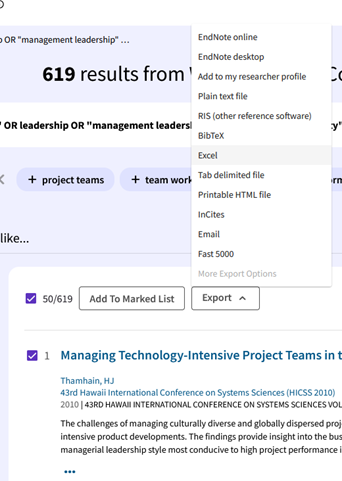
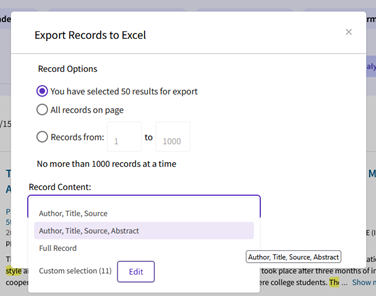
Before exporting, select which data elements should appear in the saved file:
Scopus
A Topic Search in WoS roughly corresponds to an Article Title, Abstract, or Keyword search in Scopus, so it is worth using this.
Search process:
Basic Search: It is worth entering a keyword and its synonyms in the same row, connecting the different rows with AND (538 hits).
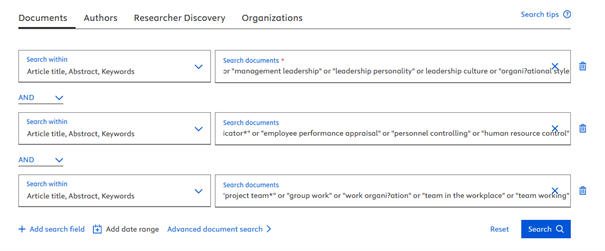
Please note: the number of hits in WoS and Scopus should be roughly similar due to the significant overlap between the two databases.
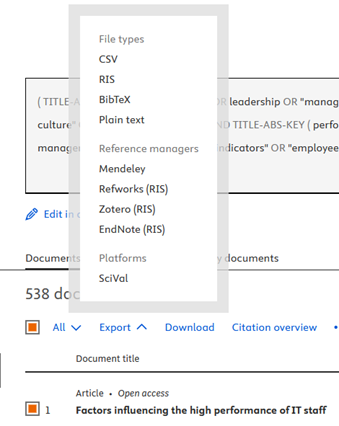
Exporting to Excel
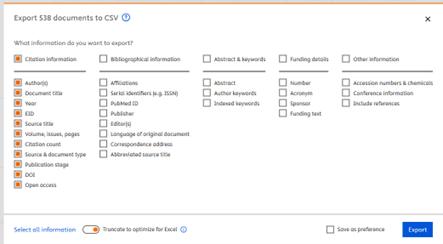
After searching, log in to export the data (you need to have an account). Scopus does not offer .xls format, but a .csv file can be easily converted.
Before exporting, select the data you need:
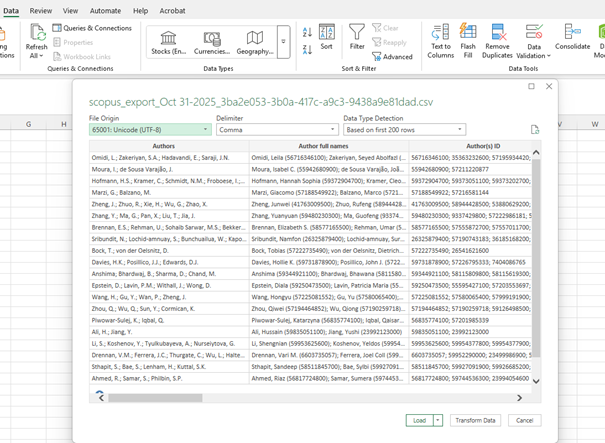
Converting a .csv file to an .xls file in Excel:
- Open a blank Excel file
- Data, From Text/CSV
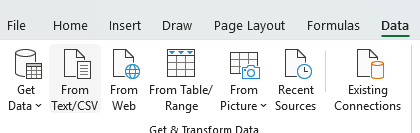
- Find the saved file, Import, if the layout is pleasing: Load
Merging downloaded data
Publication data from different databases must be merged for further processing. There are several methods for doing this: manually, using R and RStudio, using PowerQuery, or using Zotero.
Call for help: Apart from manual processing, the effectiveness of other methods has not yet been verified, and numerous questions arose during testing. If you have tried any method other than manual processing, we would be grateful if you could share your experiences with us.
Manual merging process
Please note: The order of columns exported from WoS is not the same as the order of columns exported from Scopus, so when merging, you need to pay attention to which data content goes into which column.
- Place the files saved from the two (or more) different sources in separate sheets in Excel.
- Add a new column to each file and enter the name of the source database (e.g. Scopus, WoS) from which the data was downloaded.
- Standardise the headers of the different columns, e.g.:
|
Final Column Name |
Scopus |
WoS |
|
Title |
Title |
Article Title |
|
Authors |
Authors |
Authors |
|
Year |
Year |
Publication Year |
- Select one of the files (e.g. Scopus) that is going to be the Masterfile and copy it to a separate sheet.
- Copy the data from the other file (e.g. WoS) to the appropriate columns. (There will be some unnecessary columns; remove them only after deduplication!)
- Make a copy of the merged file, keep the original safe. From the copied, you can remove the duplicates. It is worth sorting the columns by article title, as this will make it easier to see which rows contain duplicates; they will appear one below the other.
Deleting duplicates
- Select the entire document, then choose Conditional formatting/Highlight cell rules/Duplicate values
- Data/Remove duplicates – select the column on which to perform the command (e.g. title or DOI).
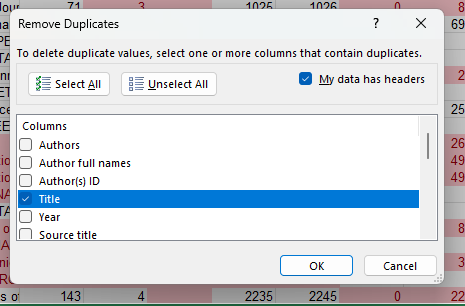
If you select Select All, only completely identical rows will be removed; rows with even a single character difference (e.g. an extra space) will not be removed.
Errors may remain if the selected data element appears differently (e.g., with capitalisation, spaces, etc.). See blue words in the example; remove these manually afterwards, e.g.:
Putting AI into Context – Method Support for the Introduction of Artificial Intelligence into Organisations
vs.
Putting AI into context-Method support for the introduction of artificial intelligence into organisations
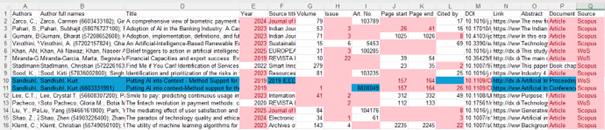
Deselect: Conditional formatting/Clear rules/Entire sheet
- After merging, delete columns that are not necessary for the analysis (e.g. OpenAccess, Publication Stage, EID, etc.), but be sure to keep the following: author(s), full name of authors, publication title, document title, year, volume, issue, article number, page number (start and end), DOI, abstract, document type, source database name.
The Prisma Flowchart
The Prisma Flowchart guides you through the steps of a systematic literature search, allowing you to record the number of documents remaining after exclusions and filters, thus ensuring reproducibility. The flowchart below clearly illustrates the necessary steps.
It is not mandatory to use the flowchart when writing an article. Still, you must follow the steps and record the number of documents remaining after each step, along with the exclusion criteria.
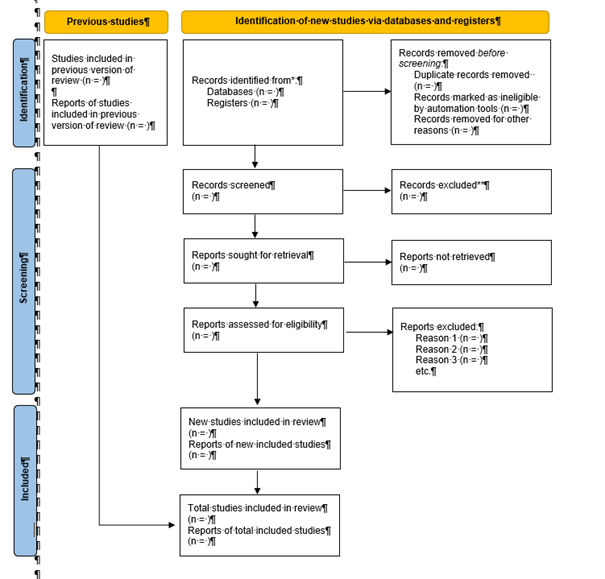
1. Figure: PRISMA 2020 flow diagram for updated systematic reviews, which included searches of databases and registers only
Versions of the Prisma Flowchart are available here.
It is important to list each database separately at the beginning, e.g. Scopus (n = 145), Web of Science (n = 25), SAGE Journals (n = 585), etc.
After removing duplicates, evaluate the sources by titles and abstracts, and establish the exclusion criteria (first screening).
Criteria may include, for example:
- content strictly related to the research question
- specific period, language, region
- studies based on empirical data
- criteria relating to age and gender (e.g. women aged 30-40)
- similarity/difference in the methods used, etc.
In the following steps, check the full texts and formulate further exclusions. It is a good idea that two researchers do this step independently, then compare the results. It is worth using a so-called literature/concept matrix to analyse the text in detail.

This is followed by a summary of the results, conclusions, comparison of statistical methods used, etc.
We recommend viewing the following series in English: Systematic & scoping reviews for social sciences & education: Part 1 – Part 5
Each part presents the basics of systematic literature search, search strategy, interpretation of the PRISMA flowchart, etc. It also introduces the subscription-based Covidence software, which facilitates systematic literature review.